3 Free Fake Chat Generators — WhatsApp, iMessage & Instagram DM Screenshots in Seconds
Create pixel-perfect fake WhatsApp chats, iMessage texts, and Instagram DMs — free, no watermark, no sign-up. Learn how to use PrankPortal's fake chat generators and pair them with AI prank calls for the ultimate prank combo.
You've found the screenshot your friend wasn't supposed to see. A suspicious WhatsApp message from an unknown number. A flirty iMessage from someone named "Alex." An Instagram DM that starts with "Don't tell anyone, but…" — except none of it is real. You made it in 30 seconds using PrankPortal's free fake chat generators.
We built three screenshot tools specifically for pranks — not design mockups, not UI prototypes, not boring portfolio demos. These are built to fool your friends, and they're all completely free with no watermark.
The Three Fake Chat Generators
Each generator runs entirely in your browser. Nothing you type ever hits a server — no accounts, no uploads, no stored data. The screenshot renders locally and downloads straight to your device.
1. Fake WhatsApp Chat Generator
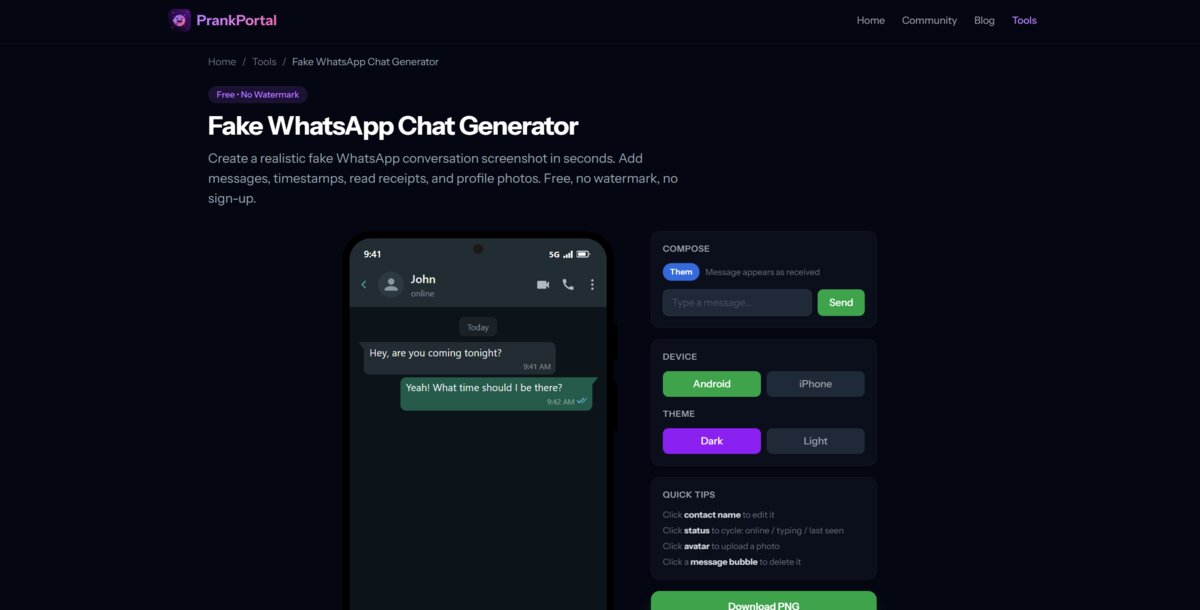
The Fake WhatsApp Chat Generator creates a realistic WhatsApp conversation screenshot with every detail dialled in:
- Custom contact name and avatar — upload any photo as the profile picture
- Send and receive messages — build the conversation from both sides
- Read receipts — toggle blue ticks, grey ticks, or no ticks per message
- Light and dark theme — match whatever theme your friend actually uses
- iPhone or Android frame — toggle the device to match your friend's phone
- Edit or delete any message — click a bubble to change or remove it
Best prank use: Create a "wrong number" conversation where someone texts your friend's partner something suspicious, screenshot it, and send it to your friend. For maximum chaos, follow up with PrankPortal's Flirty Wrong Number AI prank call from the same "person."
2. Fake iMessage Generator
The Fake iMessage Generator produces pixel-perfect iPhone text screenshots with the exact iOS styling:
- iMessage or SMS mode — blue bubbles for iMessage, green for SMS
- Light and dark theme — the real iOS colour palette
- iPhone frame with Dynamic Island — looks like an actual screenshot from an iPhone 15
- Custom contact name and avatar — make it look like it's from anyone
- Read receipts and delivery status — "Delivered" or "Read" timestamps
- Click-to-edit messages — change any bubble after adding it
Best prank use: Build a conversation where a "stranger" texts your friend something cryptic — "I saw what you did" or "We need to talk about Saturday" — then screenshot it and send it to them. Follow up with the Secret Admirer scenario to really sell it.
3. Fake Instagram DM Generator
The Fake Instagram DM Generator creates convincing Instagram Direct Message screenshots:
- Display name and username — set both the bold name and @handle
- Active status — cycle through "Active now", "Active 2h ago", "Active yesterday", or no status
- Dark and light theme — Instagram's exact colour scheme
- iPhone or Android frame — toggle between device styles
- Custom avatar — upload any profile photo
- Delivery status — show "Seen", "Delivered", or nothing under the last message
- Full icon set — camera, phone, video, and input bar icons match the real app
Best prank use: Create a DM from a "celebrity" or a fake account sliding into your friend's DMs with something ridiculous. Then send the screenshot and watch the confusion unfold. Pair it with Come Over, I'm Waiting for a prank call follow-up.
How to Use the Fake Chat Generators
All three tools work the same way. Here's the full process in under a minute:
- Open the tool — pick WhatsApp, iMessage, or Instagram DM
- Set the contact — type a name, upload an avatar photo
- Build the conversation — type messages and toggle between "sent" and "received" to build both sides of the chat
- Customise — pick your theme (light/dark), device (iPhone/Android), and tweak read receipts
- Edit if needed — click any message bubble to edit the text or delete it
- Download — hit the Download PNG button to save a clean screenshot to your device
The entire process runs in your browser. No data leaves your device.
The Screenshot + Prank Call Combo
Here's the move that separates an average prank from an unforgettable one: send the fake screenshot first, then follow up with a real AI prank call.
Think about it. Your friend gets a screenshot of a suspicious WhatsApp conversation. They're confused. They're suspicious. They start asking questions. And then — 10 minutes later — their phone actually rings, and it's the same "person" from the chat, powered by PrankPortal's AI prank call engine.
The screenshot is the evidence. The call is the knockout punch. Together, they're devastating.
Best Screenshot + Call Combos
| Screenshot | Prank Call Scenario | The Setup |
|---|---|---|
| Fake WhatsApp — flirty "wrong number" text | Flirty Wrong Number | Send the screenshot, wait 10 mins, launch the call from the same "person" |
| Fake iMessage — "I saw what you did" | Secret Admirer | Cryptic text screenshot → mysterious call from an "admirer" |
| Fake Instagram DM — celebrity slides in | Come Over, I'm Waiting | Fake DM from a crush → AI call as the same person |
| Fake WhatsApp — friend "cancelling plans" | Why Are You Calling My Boyfriend? | Fake jealous text → angry girlfriend call |
Privacy & Safety
We take this seriously:
- Nothing leaves your browser — all rendering happens locally using HTML Canvas. We never see your messages, names, or photos.
- No accounts required — no sign-up, no login, no email.
- No watermarks — the downloaded PNG is clean.
- No data stored — close the tab and everything disappears.
These tools are built for harmless pranks between friends. Don't use them for harassment, defamation, fraud, or anything illegal. If someone asks you to stop, stop.
Why We Built These
PrankPortal started as an Android app for AI prank calls — and it's grown to 10,000+ downloads. But we kept hearing the same thing from users: "I sent the screenshot first, and my friend completely lost it when the call came."
So we built the screenshot generators right into the platform. Now you can craft the setup and deliver the punchline all from one place. The fake chat generators handle the evidence, and the AI prank call engine handles the call.
All three tools are free. No limits, no daily caps, no premium tier for screenshots. Create as many as you want.
Start Creating
Pick your platform and start building:
Or browse all our free prank tools to find the perfect setup for your next prank.
Ready to Prank Your Friends?
Try PrankPortal free — 1 AI prank call every day, no card needed.
Start Pranking Free →